
Rota and shift scheduling
Rota and shift scheduling that stays live after publish
Rotas should be the plan everyone works from, not a spreadsheet that goes stale by midweek. Draft coverage, review labour before publish, route shift changes through approval, and give staff one live schedule on mobile.
Measurable outcomes
Scheduling outcomes managers can measure
Less weekly rebuild time, clearer labour visibility before publish, and faster shift communication across every site.
Minutes
Planning speed
Copy patterns and publish without rebuilding spreadsheets each week.
Pre-publish
Labour review
See scheduled hours and gaps while the rota is still a draft.
Instant
Shift updates
Approved swaps and open shifts update the live schedule immediately.
The scheduling problem
When rotas live outside the system, coverage slips
Most scheduling pain is not creating the first version. It is keeping the rota accurate after swaps, sickness, and last-minute changes.
Spreadsheet rotas at every site
Each location maintains its own file. Updates do not sync and nobody knows which version is current.
Shift changes in chat apps
Swaps and cover requests scatter across WhatsApp and email. Managers manually patch the rota afterward.
Labour cost discovered too late
Hours get assigned before anyone sees total scheduled spend, open gaps, or leave conflicts on the same week.
See scheduling in action
Build the rota on web, publish to staff on mobile
Managers plan coverage on the scheduling board while employees see shifts, apply for open shifts, and request swaps from the app.
Weekly rota planning workflow
Draft, review labour, publish, and notify staff
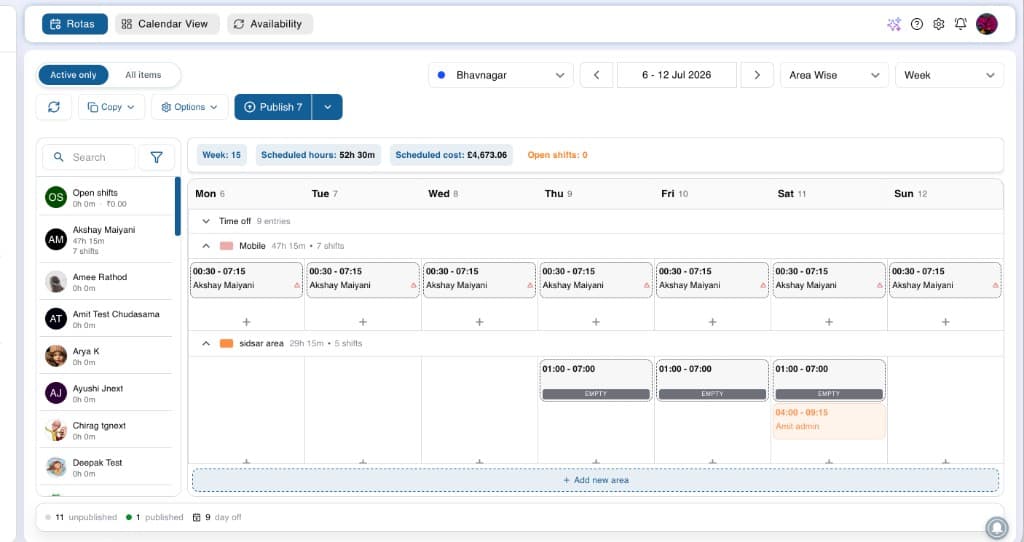
Watch a guided walkthrough in a live demo, or explore web and mobile screenshots below.
Book a live demoWeb screenshots
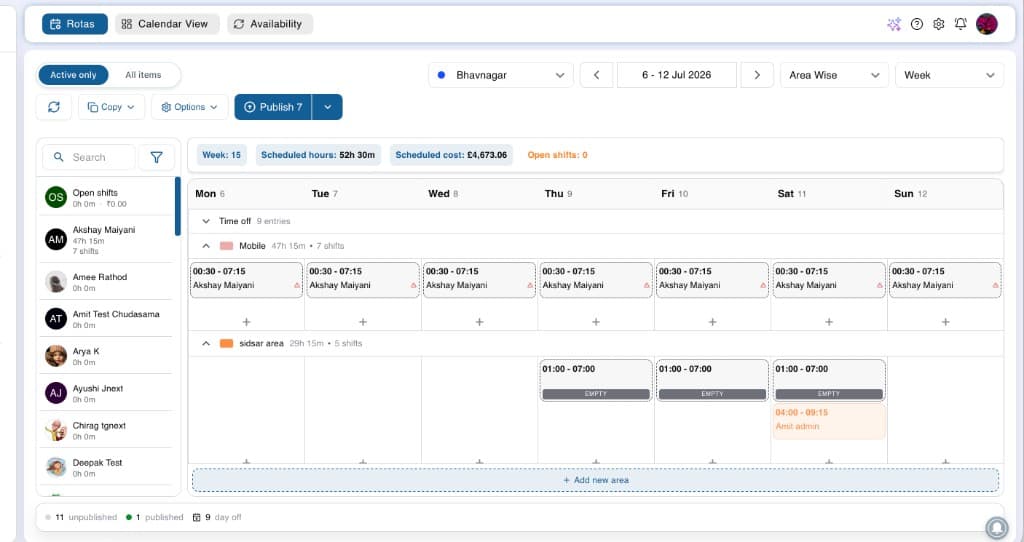
Weekly rota board
Drag shifts, copy patterns, and review labour before publish.
Scheduling scenarios
Built for the moments that break spreadsheet rotas
Rota scheduling covers the weekly planning rhythm and the exceptions that usually land on managers after publish.
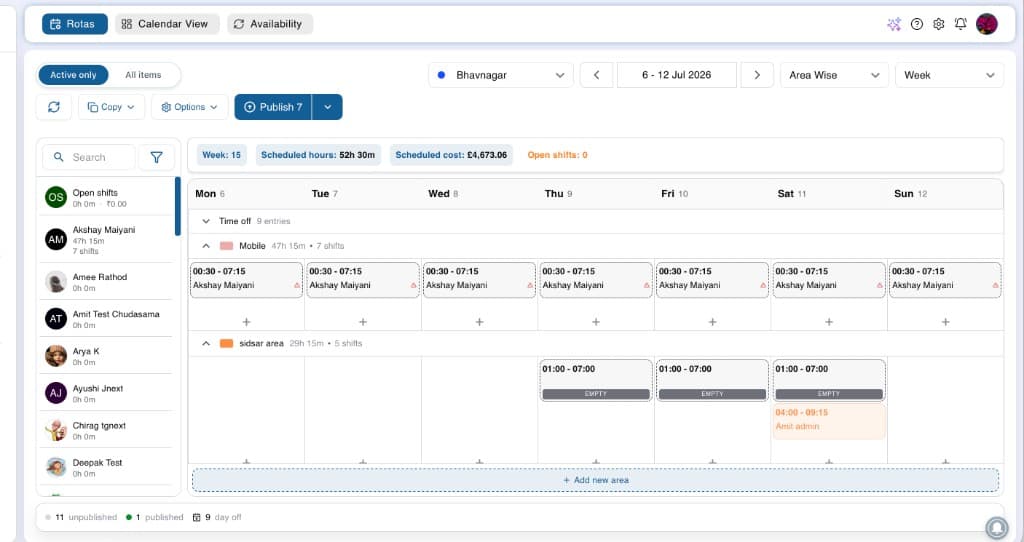
Weekly planning cycle
Copy last week's pattern, adjust for trading and leave, review labour totals, and publish before the week starts.
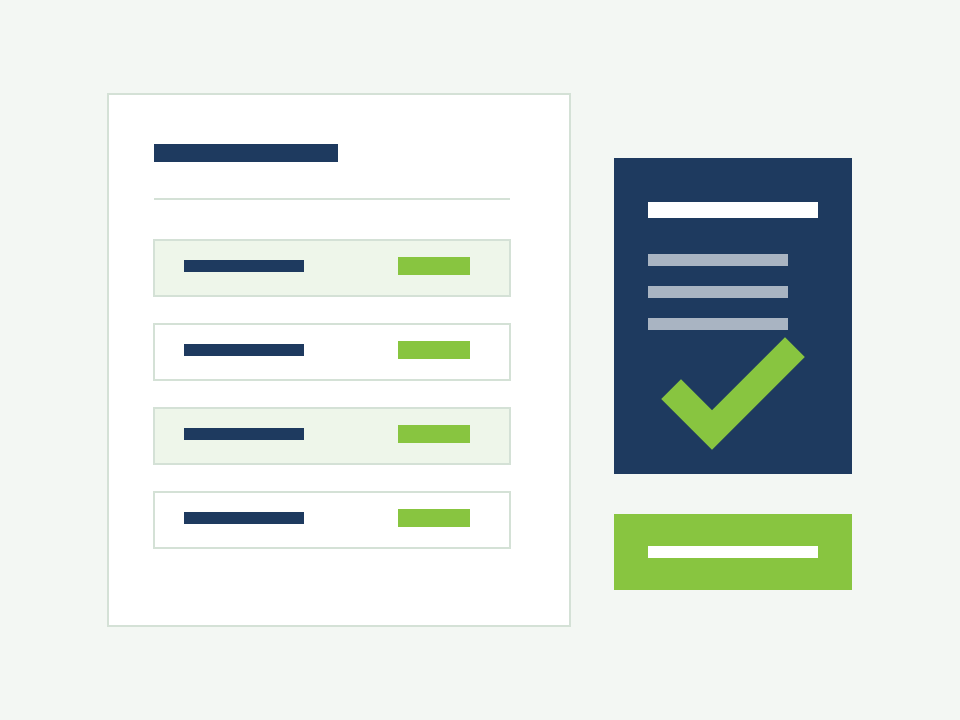
Covering sudden gaps
Publish open shifts to eligible staff. Applications come through the app; managers approve the right cover without phone tag.
Swap and offer requests
Staff propose swaps or offer shifts to colleagues. Approved changes update the live rota with a clear audit trail.
Multi-site alignment
Head office sees location rotas from one view while site managers control day-to-day edits and publish locally.
What you can do
Scheduling capabilities inside the platform
Explore how rota scheduling fits into Alphanomic, connected to attendance, leave, and mobile without another disconnected tool.
Switch between daily, weekly, area, and employee views without exporting to Excel.
- Daily, weekly, two-week, and monthly rota views
- Area and employee scheduling perspectives
- Copy previous weeks or templates into a new draft
- Bulk shift creation and bulk publish
Who it helps
One schedule, two clear experiences
Managers need control and labour visibility. Staff need clarity and a fair way to request changes.
Managers and ops leads
- Draft rotas from templates or copied weeks
- Review labour totals and open gaps before publish
- Approve swaps, offers, and open shift applications
- Publish live schedules across sites from one account
Employees on shift
- See the live rota on mobile without asking a manager
- Request swaps or offer shifts through the app
- Apply for open shifts when cover is needed
- Get notified when rotas publish or change
How it works
From draft schedule to live rota in four steps
A repeatable rhythm that replaces the weekly spreadsheet rebuild.
Set needs
Confirm trading pattern, roles, and staffing targets for each location.
Build draft
Assign shifts, copy patterns, and organise coverage by area or department.
Review coverage
Check leave conflicts, labour totals, and open gaps before anyone sees the draft.
Publish live
Managers and staff see the same schedule instantly on web and mobile.
Explore more
Works alongside attendance and multi-site control
Rota scheduling is the first step in the workforce journey. These features connect directly once schedules are live.
Attendance and time tracking
Compare scheduled hours with clock data once shifts are published.
Multi-location control
Keep every site aligned while site managers control local rotas.
Need the full product view?
Explore staff rota software for end-to-end scheduling
This page covers rota scheduling inside Alphanomic. For labour analytics, reporting exports, and the complete staff rota experience, visit the dedicated product page.
View staff rota softwareFrequently asked questions
Rota scheduling FAQs
Practical answers about weekly planning, shift changes, multi-site rotas, and how scheduling connects to attendance and leave.
Quick answers
6 questions about how this feature fits your weekly operations.
Is this the same as the staff rota software product page?
No. This page explains rota and shift scheduling as a platform feature: weekly planning, publish workflows, and shift change approvals. The staff rota software page covers the full product depth including analytics, exports, and broader workforce scheduling capabilities.
Can managers review labour cost before publishing?
Yes. While building a draft, managers can review scheduled hours, labour signals, open gaps, and leave conflicts before the rota goes live to staff.
How do open shifts and swap requests work?
Managers publish open shifts or staff initiate swap and offer requests on mobile. Every change routes through manager approval before the live rota updates, with notifications for everyone involved.
Does scheduling work across multiple UK locations?
Yes. Build and publish location rotas from a central account. Head office can monitor coverage across sites while site managers control day-to-day edits.
How does leave affect rota planning?
Approved leave and employee availability appear on the planner so managers spot conflicts during the build, not after the rota is already published.
What happens after the rota is published?
Staff see shifts on mobile immediately. Attendance tracking compares actual hours against the published schedule, and leave workflows stay connected for the next planning cycle.
Try rota scheduling
Test weekly planning and shift approvals with your managers
Start a 30-day free trial to build rotas for your locations, roles, and shift patterns, with labour review and mobile publish built in.